AI & Automation
Claude Opus 5.5 vs GPT, Gemini, DeepSeek, and Qwen: What Do You Get for the Price?
A developer’s comparison of API prices, independent benchmark charts, and the cost of getting useful work done across five major AI model families.
Rommel Clarino 8 min read
At a glance
Opus 5.5 makes a compelling case for demanding work, but the price range across models is enormous. Compare the exact model, provider, and effort setting; use benchmarks to build a shortlist, then measure cost per successful task on your own workflow.
A new Claude, a broader question
Anthropic released Claude Opus 5.5 on September 22, 2026. Its announcement emphasizes better coding performance and efficiency, including a reported 40% reduction in typical workload costs versus Opus 5. That makes it worth examining alongside the other models a developer might actually choose.
The question I care about is what it costs to get a useful result. A cheap response that needs three corrections and a manual repair may cost more than a stronger model finishing the job once. An expensive model can also be unnecessary for a simple labeling task.
This is a source-based comparison, checked September 24, 2026, rather than a hands-on review. Prices come from providers; the two original benchmark charts come from Artificial Analysis. The workload estimate later in the article is my calculation, not a benchmark result.
Compare model versions, not chatbot names
ChatGPT is the product name; the OpenAI API entries here are GPT-6 Astra, Sol, and Luna. The rest of the shortlist is Claude Opus 5.5, Gemini 3.8 Flash, DeepSeek V4.1 Flash and V4 Pro 0813, and Qwen3.8 Max 0902 and Flash. This spans premium and lower-price options without pretending they offer identical capabilities.
The comparison covers paid text API usage. Chatbot subscriptions, bundled coding plans, free allowances, batch discounts, and self-hosting expenses are separate purchasing decisions. A monthly subscription does not translate directly into a universal price per million tokens.
Exact names matter. DeepSeek currently maps deepseek-flash to V4.1 Flash and deepseek-v4-pro to V4 Pro 0813. For Qwen Max, the dated qwen3.8-max-0902 identifier makes the version explicit. Record the endpoint and configuration alongside the model name when comparing your own results.
The API price comparison
All numbers below are US dollars per million tokens. Input means uncached input; cached input is shown separately. These are the stated provider rates under the conditions in each row, before taxes and additional services. Horizontal scrolling is available on small screens.
OpenAI rows use Standard processing and the short-context price tier. Gemini’s displayed promotion runs through December 31, 2026; the listed input and output rates then double. DeepSeek rows use peak pricing, with off-peak rates half as much. Qwen uses Alibaba’s Singapore endpoint with International deployment scope; another region can have a different rate.
Cache reads are not the whole caching bill. Creation or storage may add costs. Google lists storage separately, and Alibaba explicitly excludes these Qwen3.8 models from its usual explicit-cache discount, directing readers to the console. I have left those cells unpriced rather than assuming a discount.
| Model | Provider / conditions | Input | Output | Cached input |
|---|---|---|---|---|
| Claude Opus 5.5 | Anthropic · standard | $4.00 | $20.00 | $0.20 |
| GPT-6 Astra | OpenAI · standard, short context | $10.00 | $50.00 | $1.00 |
| GPT-6 Sol | OpenAI · standard, short context | $2.00 | $10.00 | $0.20 |
| GPT-6 Luna | OpenAI · standard, short context | $0.10 | $0.50 | $0.01 |
| Gemini 3.8 Flash | Google · standard, promotional | $0.75 | $3.75 | $0.075 + storage |
| DeepSeek V4.1 Flash | DeepSeek · peak hours | $0.30 | $1.20 | $0.006 |
| DeepSeek V4 Pro 0813 | DeepSeek · peak hours | $1.32 | $3.96 | $0.044 |
| Qwen3.8 Max 0902 | Alibaba · Singapore / International | $2.00 | $6.00 | See console; model-specific |
| Qwen3.8 Flash | Alibaba · Singapore / International | $0.15 | $0.47 | See console; model-specific |
Capability versus the cost of doing the work
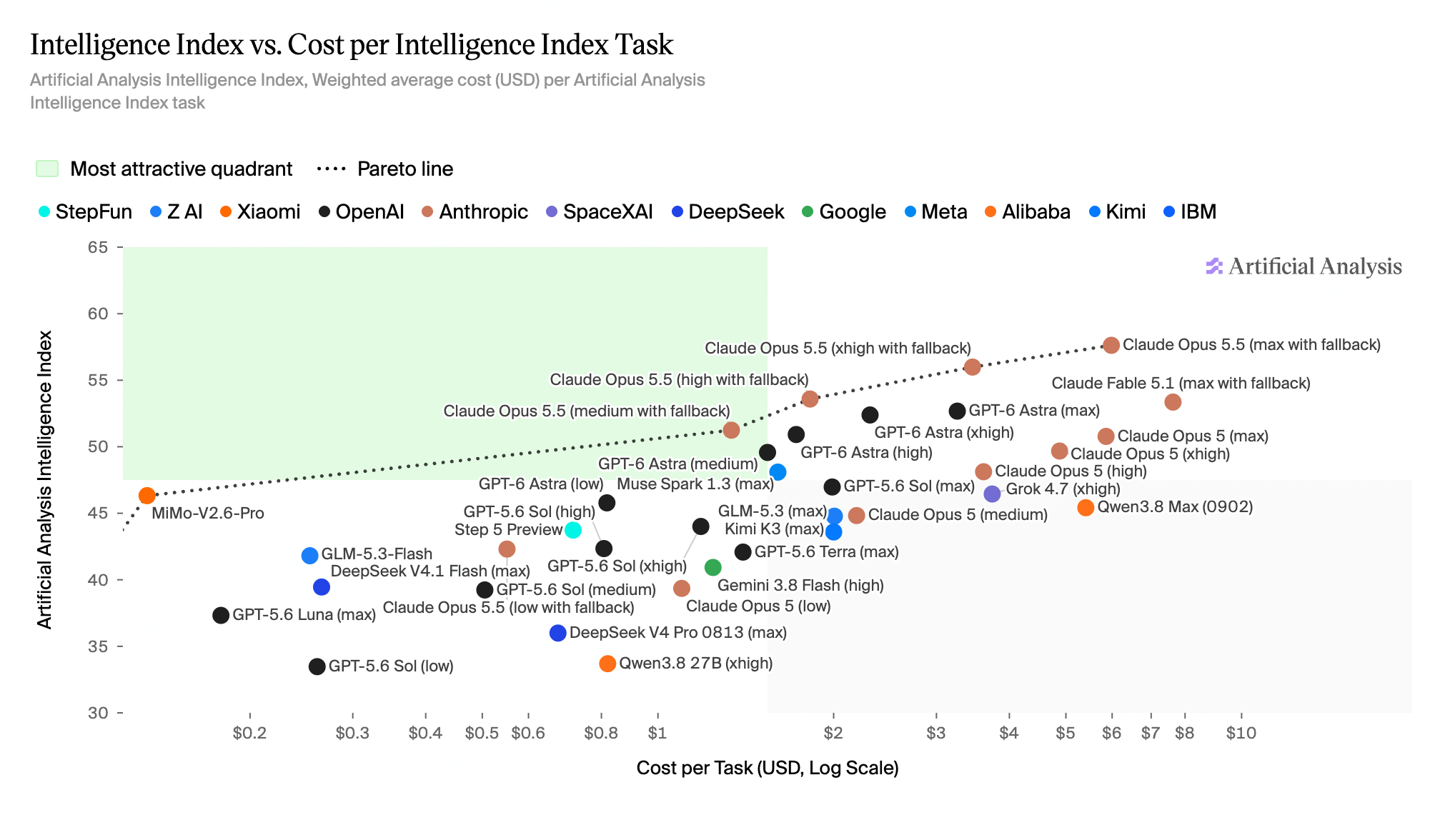
Artificial Analysis’s September 22 chart places model configurations against its Intelligence Index and weighted cost per evaluation task. It includes all five model families discussed here. The cost axis is logarithmic: equal horizontal spacing does not represent an equal dollar increase.
Look at the effort labels as closely as the model names. Opus 5.5 appears at several settings, and its evaluations use the default fallback. This is evidence about those tested configurations. It is not a promise that every call to the named model will have the same cost or quality.
The snapshot includes GPT-6 Astra but older GPT-5.6 Sol and Luna. Their points must not be relabeled as GPT-6 Sol or Luna to match the current pricing table. Qwen Flash is also absent. A missing result is a gap in this comparison, not a zero score.
What coding and knowledge-work benchmarks tell us
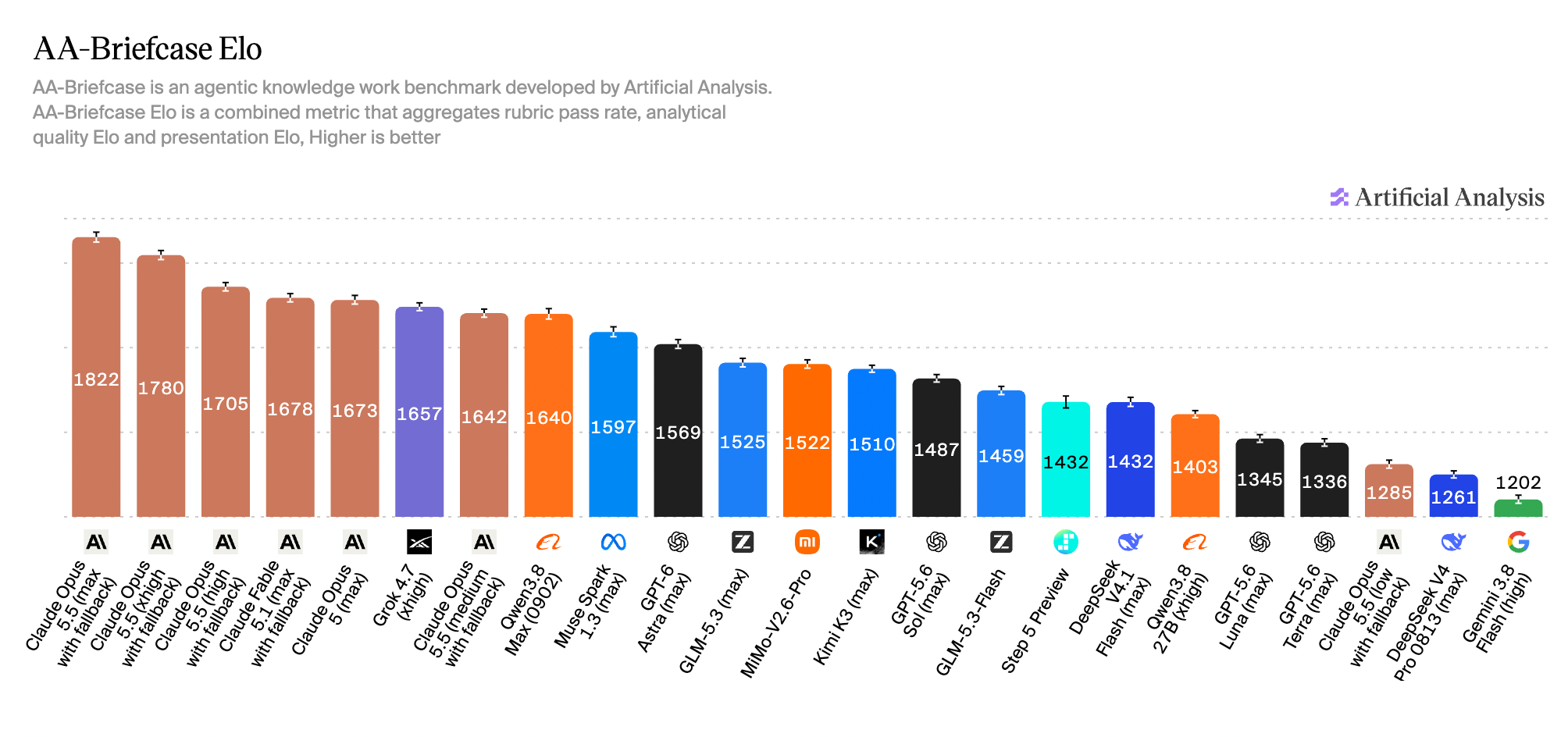
For coding, Artificial Analysis reports 59.6% on Terminal-Bench 4.0 for Opus 5.5 at max effort, level with GPT-6 Astra at xhigh. For knowledge work, its AA-Briefcase chart below compares the quality of professional deliverables. These evaluate different kinds of work; a win on one does not establish a universal winner.
The knowledge-work chart is useful because it puts Qwen, DeepSeek, and Gemini alongside Claude and GPT configurations. Read it as one task suite’s assessment, including presentation quality, rather than a ranking of every possible application.
Keep the evaluation setup attached to the number. Anthropic’s release page reports a different Terminal-Bench result from its own setup. Combining those figures into a single leaderboard would hide differences in effort, tools, and evaluation conditions. The same caution applies to AutomationBench and AutomationBench-AA: similar names do not establish identical tests.
An equal token budget, priced nine ways
To make the price table concrete, imagine 100 requests, each billed for 10,000 uncached input tokens and 1,000 output tokens. That is one million input tokens plus 100,000 output tokens across the batch. The calculation is input price + 0.1 × output price.
Here, output includes all billed output, including any billed reasoning tokens. We assume no cache hits, tools, retries, batch discounts, or extra storage charges. Each request must remain in the quoted input tier. This is a controlled arithmetic comparison, not a claim that the models need identical tokens to solve the same problem.
Under these assumptions, Opus 5.5 costs $6, while GPT-6 Astra costs $15. At the low end, GPT-6 Luna costs $0.15 and Qwen3.8 Flash costs $0.197. That spread is a reason to evaluate cheaper options for narrow tasks; it does not tell us which outputs will pass review.
- GPT-6 Astra$15.000
- Claude Opus 5.5$6.000
- GPT-6 Sol$3.000
- Qwen3.8 Max 0902$2.600
- DeepSeek V4 Pro 0813$1.716
- Gemini 3.8 Flash$1.125
- DeepSeek V4.1 Flash$0.420
- Qwen3.8 Flash$0.197
- GPT-6 Luna$0.150
USD · linear scale · calculated estimate, not measured task performance
The costs a price chart leaves out
A useful workflow has a quality threshold. If a classification must be corrected by a person, include that correction effort when evaluating the model. If an agent makes repeated tool calls, include the external service bill and elapsed time. Count failed attempts as part of what you spent to obtain the successful ones.
Measure latency where your application runs. Fast token generation does not guarantee a fast completed task: the model might spend time reasoning, waiting for a tool, or recovering from an error. Record total time as well as how quickly the first answer appears.
Context limits are another practical constraint. Check whether your actual request fits, whether longer requests enter a different billing tier, and whether the model can reliably use the information you include. A large advertised window is not a reason to send every document on every call.
Deployment flexibility also needs a separate check. A family name does not mean every model in that family has downloadable weights. If you want to self-host, verify the exact release and license, then budget hardware, serving infrastructure, and operations instead of treating an API price as a self-hosting estimate.
The shortlist I would test
For complex coding and investigations, I would compare Opus 5.5 with GPT-6 Astra at more than one effort setting. The coding evidence makes both worth testing. Include a less expensive candidate such as GPT-6 Sol to see whether the premium changes the outcome on your actual tasks.
For high-volume extraction, labeling, and routing, I would start with GPT-6 Luna, Qwen3.8 Flash, and DeepSeek V4.1 Flash as price-driven candidates. Add Gemini 3.8 Flash if it fits your existing stack. These are candidates for evaluation, not a claim that their accuracy is interchangeable.
For document-based professional work, include Qwen3.8 Max alongside the Claude and GPT options. Check evidence quality and factual correctness separately from presentation. A polished report with an unsupported conclusion should fail your review regardless of its benchmark position.
The best choice may be a small routing policy: a cheaper model handles a bounded first pass, while uncertain or demanding cases go to another model or a person. Measure the entire path, including escalation, before deciding that it saves money.
Keep the workflow; evaluate the upgrade
In the previous article, I mapped a support workflow into input, validation, a routing decision, action, and confirmation. A model comparison belongs inside that map. Change the judgment step, then check whether the completed workflow actually improves.
Choose representative requests with known acceptance criteria. Keep prompts, tools, permissions, and scoring consistent, record the exact model and effort setting, and repeat enough tasks to expose variation. Track successful completion, incorrect actions, review time, latency, and total spend. Do not turn permissions or verification off to make a new model look faster.
Opus 5.5 is a good reason to revisit the shortlist. The practical purchase decision is still yours: which configuration completes your work reliably at a cost you can sustain? That answer should come from a measured workflow, with the public charts helping you decide where to start.