AI & Automation
Before You Build an AI Agent, Map the Workflow
A practical way to break a process into inputs, decisions, actions, and exceptions—and find where AI can actually help.
Rommel Clarino 6 min read
At a glance
Start with one clear outcome. Map the steps, separate fixed rules from judgment, and give missing information and uncertain answers a place to go. Then automate a small part of the process and measure whether it improves the result.
Start with the work you want done
“Build an AI agent to handle support” sounds like a brief. Try implementing it, though, and the unanswered questions appear immediately. Does handling support mean sorting messages, drafting replies, changing account details, or issuing refunds? Who decides when the job is finished?
I would start with a smaller sentence: when a customer sends a request, create one ticket in the right queue, or send it to a person if the destination is unclear. That gives us a trigger, an outcome, and a boundary we can inspect.
This article uses that hypothetical support process throughout. It is a planning exercise you can adapt to document intake, lead routing, or internal requests. Before choosing a model or framework, we will make the work visible.
Draw five boxes before choosing tools
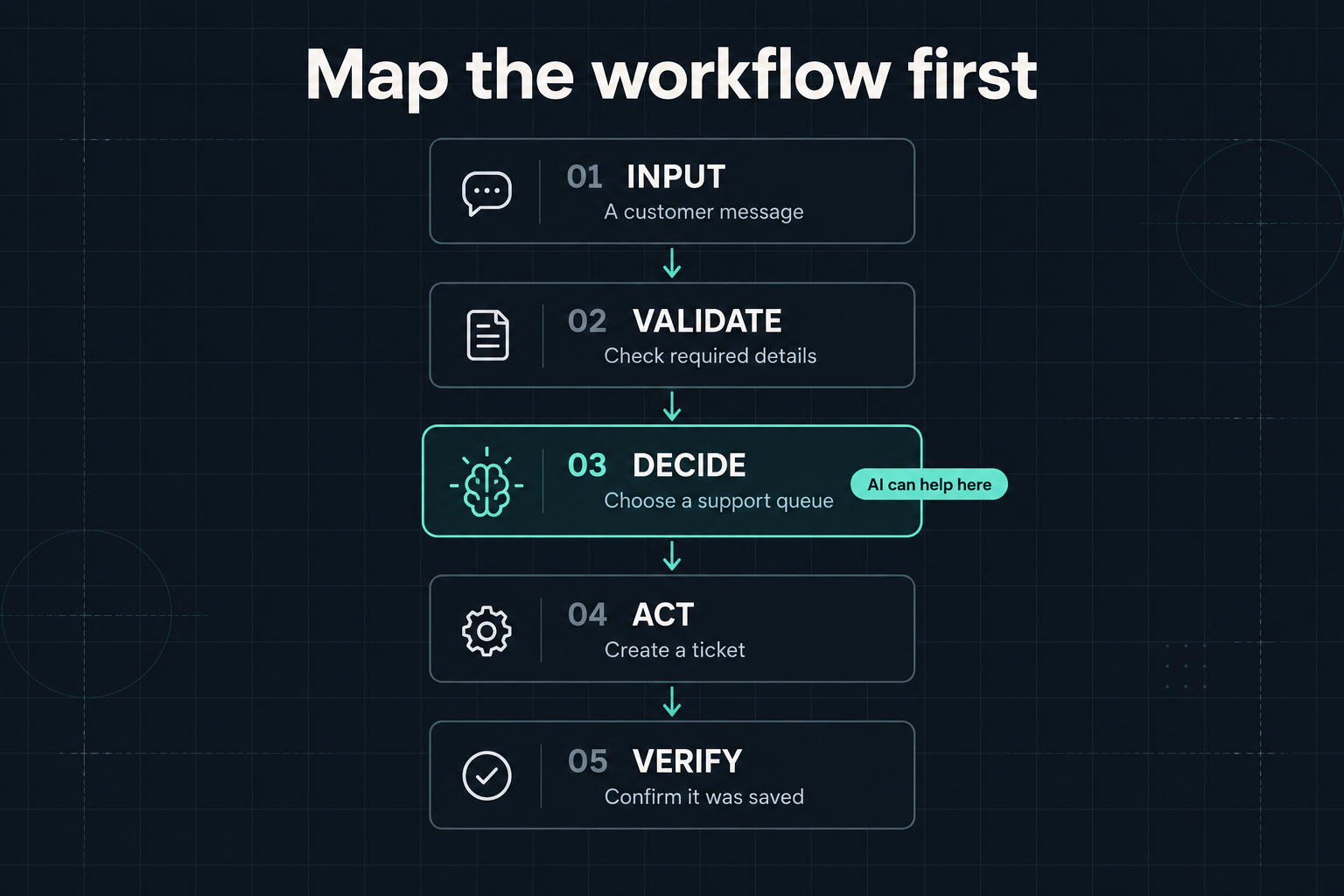
The first map can be plain: receive the message, check the required details, choose a queue, create the ticket, and confirm that it was saved. Each box should describe an observable step. “Understand the customer” is too vague; “choose billing, technical support, or sales” gives us something to evaluate.
For each step, write down what arrives and what must leave. The input might contain a message ID, the message body, and a reply address. The routing step should return an allowed queue or a request for review. The ticket service should return a saved ticket ID. These small agreements make it easier to locate a failure.
The last box matters. A model saying it created a ticket is not confirmation that a ticket exists. Completion should depend on evidence from the system that stores it.
Separate rules from judgment
Some steps already have exact answers. Is the message empty? Have we processed this message ID? Is the proposed queue on our allowed list? Write those checks directly in code. Asking a model to answer them adds another source of uncertainty to a rule we already understand.
Other steps involve interpretation. “I upgraded yesterday and now I cannot access my workspace” could involve billing, access permissions, or a technical fault. A model might help interpret the wording, but the team still needs a routing policy for cases that cross categories.
Write that policy before improving the prompt. For this example, we might decide that loss of access goes to technical support first, with a billing tag attached when relevant. That is a proposed business rule, not something the model should quietly invent. If the people running the process disagree about the destination, resolve that disagreement in the workflow.
Give uncertainty a route
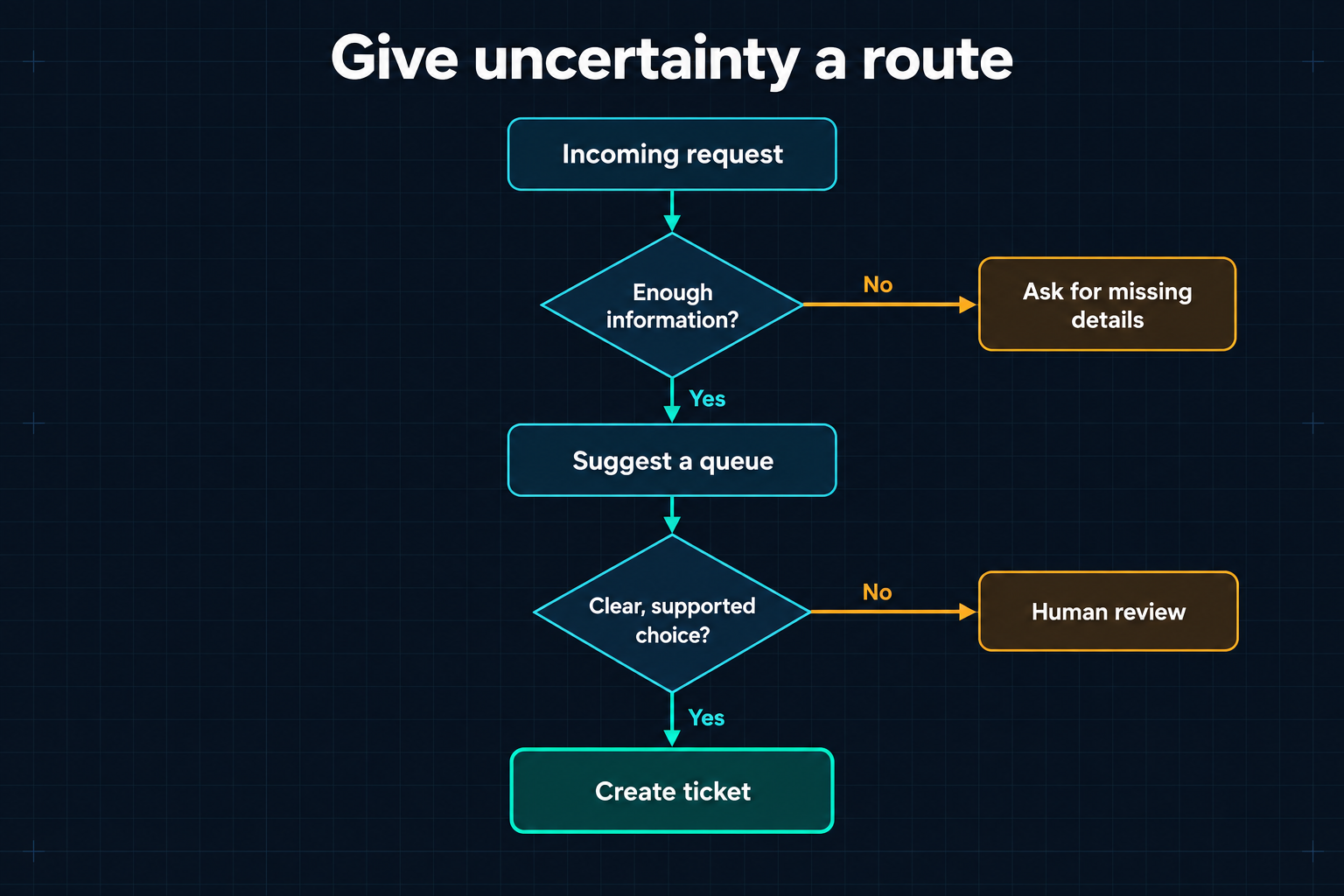
The straight line only describes requests that go smoothly. Add the branches next. Missing details should lead to a request for information. An unsupported category or an ambiguous message should reach a named review queue. The diagram below shows those exits before ticket creation.
For the support example, “Enough information?” means the fields required for routing are present; it does not mean we already have everything needed to solve the issue. “Clear, supported choice?” means the suggested queue passes the allowed-value checks and the acceptance criteria we have evaluated on representative messages. It should not mean the model merely sounds sure.
A human handoff also needs an owner and useful context. Include the original request, the suggested destination, and the reason for escalation. Otherwise, “human review” becomes a box where work accumulates without anyone knowing what to do next.
After the missing details arrive or a reviewer chooses a queue, resume from the relevant validation step. Preserve the original request ID so that resuming does not create a second copy of the same job.
Decide what happens when an action fails
Even a correct routing decision can run into an unavailable ticket service. Keep the request pending, record the failure, and define a limited retry policy with an escalation after repeated failures. A request should never disappear just because the final API call failed.
Timeouts need particular care: the service may have saved the ticket even though the reply never reached us. Use a stable request identifier and the destination service’s duplicate-prevention mechanism, when available. If the outcome is unknown, reconcile it with the service before blindly creating another ticket.
Put permissions on the map as well. This workflow needs permission to create and route tickets. It does not need permission to refund payments or change account ownership. Keeping its available actions narrow makes the process easier to reason about and review.
Now ask whether you need an agent
Anthropic’s “Building effective agents” draws a useful distinction: workflows follow paths defined in code, while agents let the model direct its process and tool use. That distinction helps us describe what we actually need.
Our support router has a known sequence and a bounded decision. I would begin with a workflow containing one model-assisted routing step. A more open-ended investigation—where the system must choose which records to inspect and what to check next—could justify an agent.
Even then, keep the outcome, tool permissions, stopping conditions, and escalation paths explicit. Mapping the workflow helps expose which choices genuinely need to be made at runtime and which can be decided in advance.
Try a small slice and measure the result
Begin with routing suggestions that a person reviews before they affect live work. Use representative messages, including incomplete requests, overlapping categories, duplicates, and requests outside the supported scope. Keep some examples separate from the ones used to tune the prompt so that the evaluation includes unfamiliar cases.
Compare the suggestions with the existing process or a simple rule-based baseline. Track incorrect routes, the proportion sent for review, time to a confirmed ticket, and total cost per completed request. Count retries and the work required to correct mistakes. A quick model response is only one part of a useful outcome.
Look at the errors by category. If the model repeatedly confuses billing questions with access problems, the next improvement might be clearer routing definitions or better context. Expanding its autonomy would not resolve that underlying ambiguity.
A brief you can write before you build
For your own process, complete these seven lines: the trigger is __; a successful outcome is __; the required information is __; the fixed rules are __; the judgment needed is __; uncertainty goes to __; completion is confirmed by __.
For our example: a message arrives; one ticket reaches the appropriate queue; we need the message ID, body, and reply address; code checks required fields and duplicates; AI suggests a queue; unresolved cases go to the support lead; the ticket service confirms the saved ID.
Take one real request and walk it through that brief. Then try one with missing information and one where the external service fails. Any step you cannot explain is a useful place to work before adding a model. Once the path is clear, you can choose the smallest piece of automation that makes it better.