AI & Engineering
No Source Code? REA Gives Your AI Agent a Way In
Explore Reverse Engineer Anything through Notion, DX-Ball, Aegis, Touhou, a CTF challenge, and community video demos—with evidence and source links.
Rommel Clarino 12 min read
At a glance
REA connects coding agents to reverse-engineering tools through CLI and MCP. Its worked examples recover specific calculations and trace features with evidence. Explore official investigations, two embedded community videos, and the checks that distinguish a useful reconstruction from an attractive demo.
Your agent can write an app. Can it explain one?
A feature catches your eye in a desktop app. You can ask an AI coding agent to build something similar, but a screenshot leaves important questions unanswered: what calculation runs underneath, which process handles the request, and what happens at the boundary?
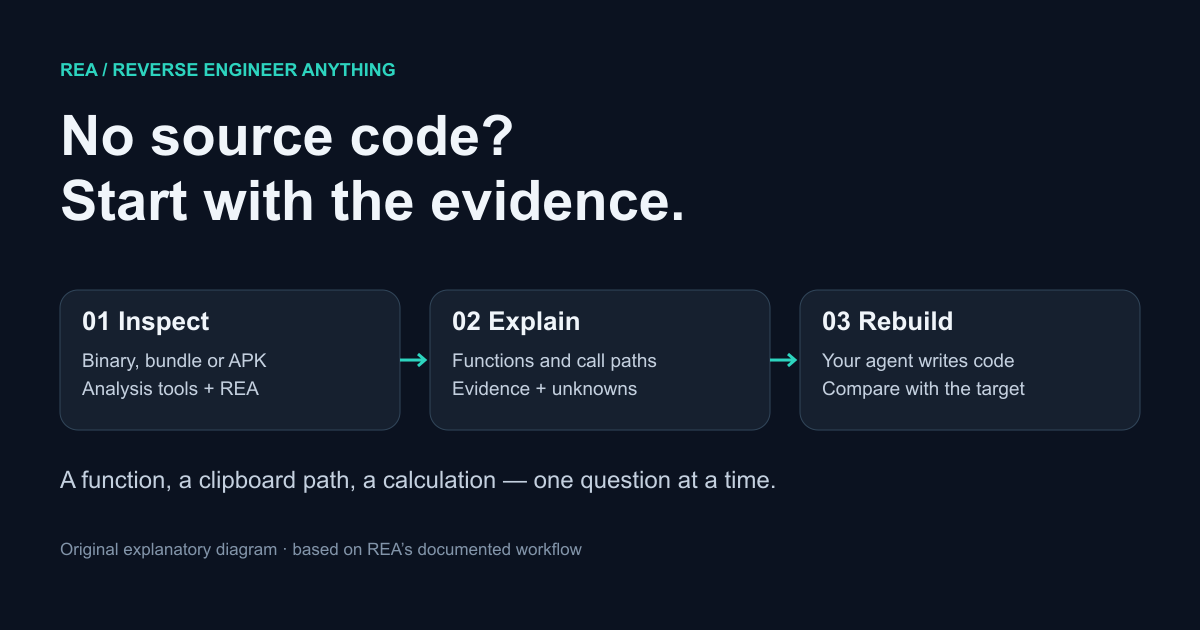
REA—Reverse Engineer Anything—gives that agent a way to investigate the software itself. The GitHub project connects coding agents to analysis tools through a CLI and an MCP server. During this research on October 13, 2026, GitHub displayed roughly 159,000 stars. That is a snapshot of attention; the more useful evidence is in the worked examples.
I followed the project documentation, official case studies, upstream code, and community videos. The examples below show recovered calculations, a traced clipboard feature, and visible rebuild demos. REA’s authors explicitly distinguish this work from recovering an application’s original source or automatically cloning it.
REA (@reatools) on X
The project’s official introduction on X. Read the worked investigations below to assess the results behind the headline.
What REA adds to a coding agent
REA organizes the investigation. A native analysis engine such as Ghidra, Hopper, or IDA supplies instruction listings and decompiled pseudocode. REA exposes those capabilities to the agent with consistent requests and evidence. The agent chooses follow-up questions, interprets the results, and can write a new implementation.
The path depends on the target. Static JavaScript analysis can inspect an application directory or ASAR archive without launching it or requiring a native decompiler. Android analysis uses a headless JADX provider to inspect classes, methods, and references. Browser and process workflows can add observations of behavior.
A useful result includes the target’s identity, the relevant location, and unresolved findings. Decompiled pseudocode is a recovered representation, not the original source. A static call relationship is evidence of structure; proving that it executed requires an appropriate observation.
| Target | Useful question | Evidence to inspect |
|---|---|---|
| Native executable | How is this number calculated? | Instructions, constants, caller references |
| Electron package | Where does this exposed method go? | Modules, preload bridges, IPC handlers |
| Android APK | Which method generates this value? | Classes, decompiled methods, references |
| Running browser or process | What happened during this action? | Scoped observations and comparable captures |
REA at work: recovering DX-Ball’s sound calculation
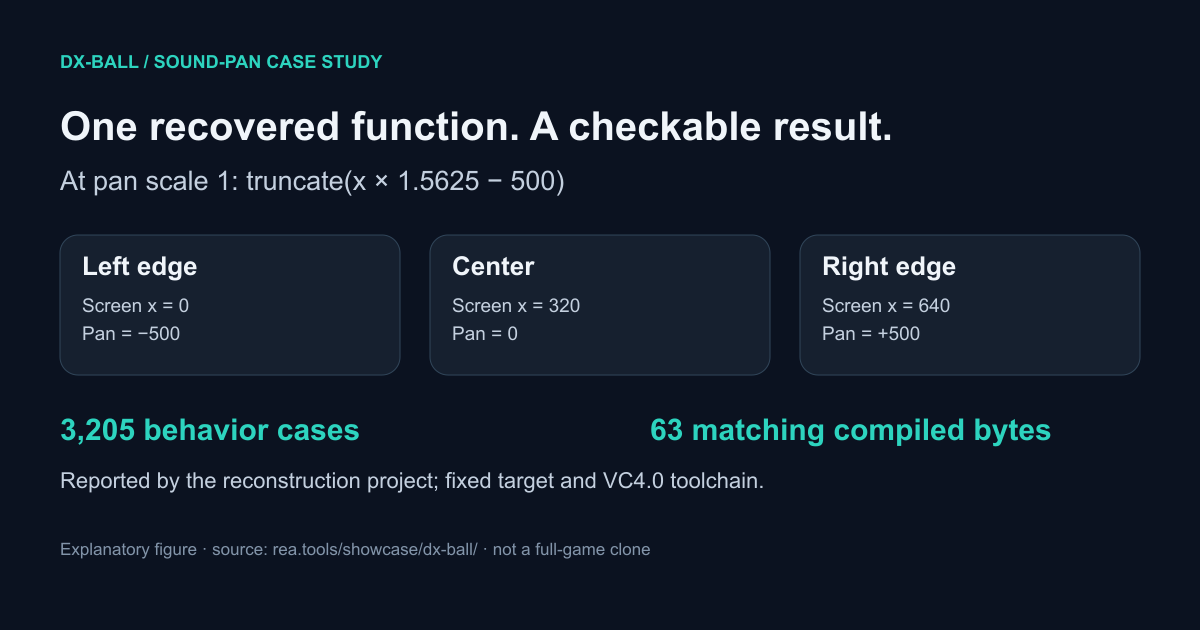
The DX-Ball study starts with a precise question: how does a brick’s horizontal position become a sound-panning value? An incomplete decompiler result shows a conversion call but hides the input. REA’s instruction view reveals the stack argument; caller inspection explains its screen-coordinate meaning, and byte reads establish the constants.
At a pan scale of one, the recovered rule multiplies x by 1.5625, subtracts 500, and truncates to an integer. The reconstruction project reports agreement with the original x86 across 3,205 cases, plus all 63 compiled function bytes under a pinned VC4.0 toolchain after reviewed relocations.
That is evidence for a particular function and target. The case study says integrating the result with the sound backend remains further work. It does not establish that REA produced a finished playable game.
REA at work: following Notion’s clipboard bridge
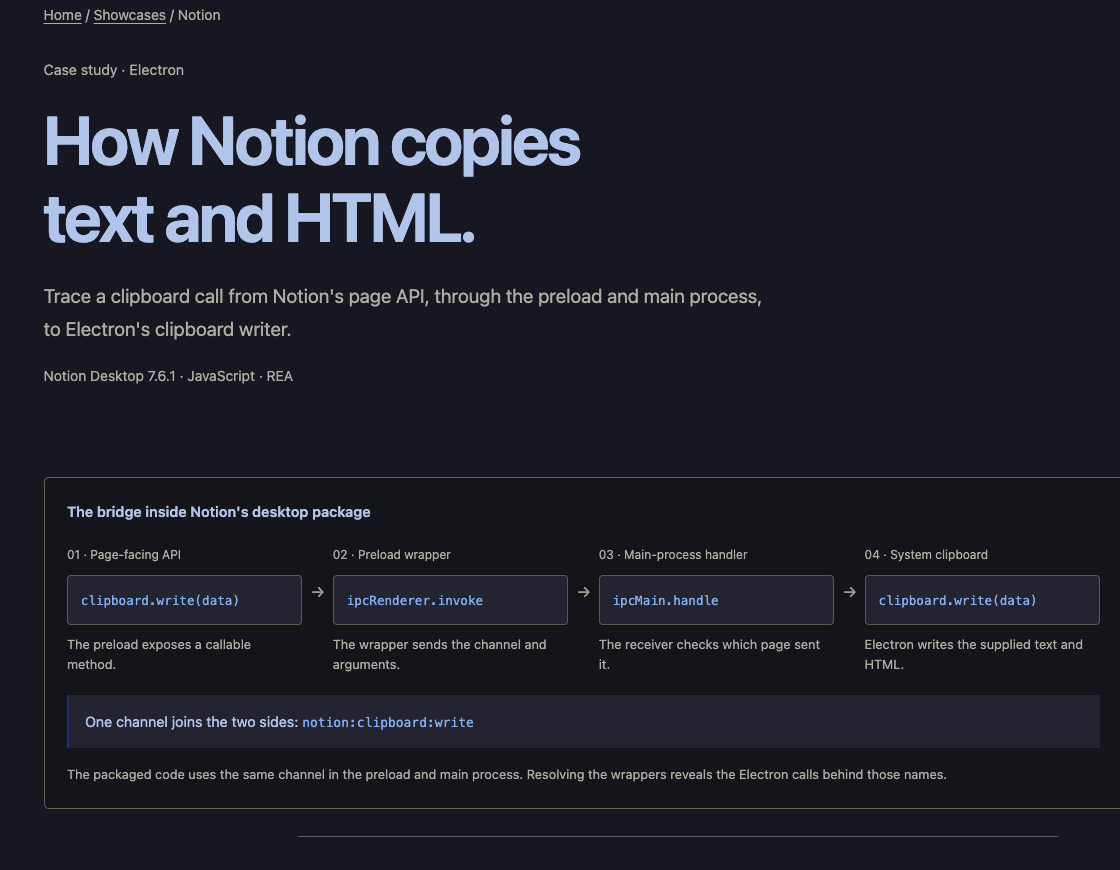
Notion’s example follows one copy operation across an Electron application. The page-facing clipboard method reaches a preload wrapper, which sends an IPC request to a main-process handler. The receiver checks the sender before calling Electron’s clipboard writer. The shared channel name connects the two ends.
REA’s analysis locates the exposed API and the invoke operation in the saved preload bundle. Reading the wrappers then connects the specific clipboard member to its receiver. That distinction makes the case stronger: the report identifies what the tool found and what further reading established.
The rich-copy example also connects an HTML identifier with locally stored block data. Its probes use cached web assets and extracted modules, rather than a captured live desktop copy-and-paste session. This is a traced feature in specified artifacts, not a reconstruction of Notion’s collaboration backend.
REA at work: explaining an Android login code
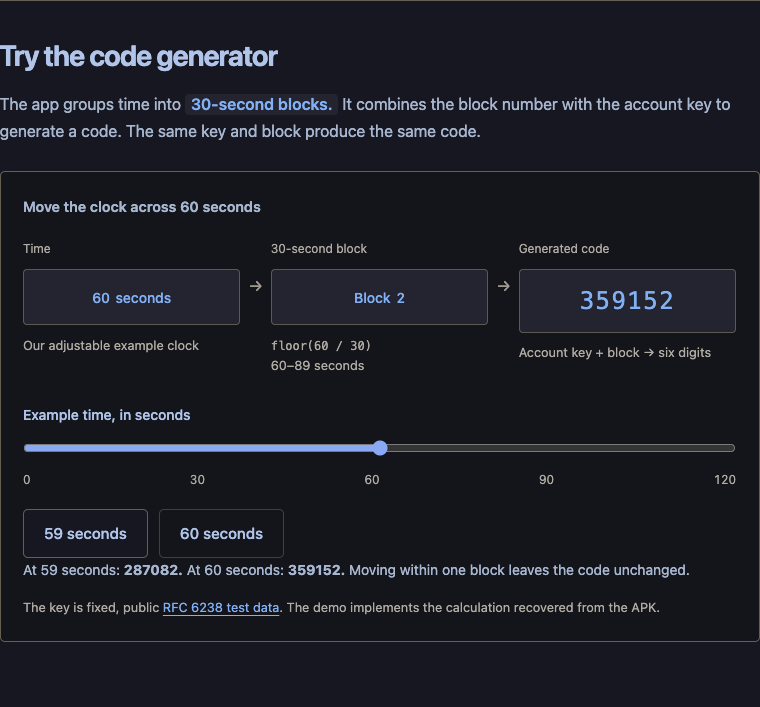
The Aegis study inspects the authenticator’s released APK and narrows thousands of classes to the methods that generate its changing code. The recovered defaults group time into 30-second blocks and combine the block number with an account key to produce six digits.
The official browser demo uses a fixed public test key. At 59 seconds it shows 287082; at 60 seconds it shows 359152. I checked that visible transition in the published demo. The study reports 133 comparisons involving extracted Java methods and checks against published SHA-1 reference cases.
Aegis is open source, so matching release code provides a useful cross-check. The APK analysis is static, and the browser generator is a reconstruction. The pictured codes are public test data, not codes from a real account.
REA at work: a Touhou bullet ring from 16-bit instructions
The TH04 case asks how a PC-98 game aims a ring of bullets. REA returns the angle helper’s original instructions, exposing the index, count, player-coordinate differences, and rotation. The readable explanation spaces directions around a 256-unit turn, adds the player direction and template rotation, and keeps the final angle in one byte.
For a 16-bullet ring, the base spacing is 16 angle units. That gives a concrete reason the pattern forms a ring instead of a collection of guessed trajectories. The case’s interactive figure makes the relationship visible.
The linked reconstruction records 2,139 matching bytes for the larger bullet-generation section under a pinned Turbo C++ toolchain. That check includes the helper; it is not a count of bytes belonging only to the short explanatory function. The study separately identifies target-provenance and runtime scope.
REA at work: checking a CTF answer against the original
The DownUnderCTF example investigates a deliberately published flag-checking challenge. REA locates the input prompt, follows its references, and returns the checking functions and stored data. The analysis turns 26 checks over 36 character positions into equations.
A Python solver produces a candidate. The decisive step is the original executable’s response: the report captures it accepting the candidate and rejecting a version with one selected character changed. The organizers’ source and metadata provide a separate cross-check after the binary investigation.
This is a useful model for evaluating reconstructed behavior. A plausible explanation becomes more persuasive when a controlled input exercises the original program and a nearby counterexample changes the result.
Two approachable examples: a dinosaur and a percent button
REA’s homepage also shows a browser-game speed investigation and a Windows Calculator percentage example. These are easier entry points than a disassembly listing: the output is behavior you can try immediately.
For the inspected Chromium-derived dinosaur game, the published rule starts at speed 6 and increments by 0.001 on qualifying updates toward a cap of 13. The new teaching game lets the reader change speed. For Calculator, 200 + 10% becomes 220, while 200 × 10% becomes 20; the previous operator changes how the percent input is interpreted.
The page links the inspected game script and Microsoft’s percentage implementation. Together, the demonstrations show a practical goal: recover one rule, explain why it produces the visible result, and use it in a small new implementation.
| Example | Visible rule | What to change |
|---|---|---|
| Dinosaur game | Speed starts at 6 and grows toward 13 | Adjust speed in the official speed lab |
| Calculator: 200 + 10% | 10% of 200 is added to 200 → 220 | Switch from addition to multiplication |
| Calculator: 200 × 10% | 10% becomes 0.1 → result 20 | Compare the percentage branch |
Community video: rebuilding Preview
Nick Saraev’s video puts the idea into a desktop-app exercise. Its “Rebuilding Preview” chapter begins at 2:44, followed by “Matching the App” at 4:46. The embedded player opens at the rebuild chapter so you can inspect the demonstration yourself.
Watch for the connection between the investigation and the resulting feature. Which tool output informed the implementation? Which behavior was checked? A video demonstration is useful context, but it does not provide the same assurance as the pinned artifacts and comparisons in the function-level case studies.
Community video: a custom player called Tempo
Mark Kashef describes using REA with Ghidra and an AI coding setup to rebuild QuickTime Player with playback controls he wanted. His video names the resulting player Tempo and includes a testing chapter at 5:28. The embedded player starts there.
This illustrates the appeal of adapting a familiar feature to personal requirements. Treat the result as the creator’s demonstration. It does not establish full QuickTime compatibility, a general reconstruction success rate, or that every setup component described in the video is included in REA’s published npm package.
The evidence is the feature I care about most
REA’s contracts preserve a distinction that matters: observations, inferred relationships, and unknowns. Static analysis can show a route through code without establishing that a particular action took it. Runtime observation can add evidence, but it must be connected to the right artifact and location.
The reconciliation documentation makes those identity checks explicit, including source digests and ambiguous matches. Its reconstruction ledgers turn findings into claims that still need verification. An unresolved or incomplete check remains open; missing evidence should not quietly become a passing result.
That is the habit I would borrow even without REA: keep the question small, attach the evidence to the answer, and retain the conditions under which the answer was checked. The repository’s conformance fixtures test its contracts; they are not a benchmark proving arbitrary software can be reconstructed.
Try one narrow investigation first
For a first experiment, I would choose an app you own or are authorized to examine and ask about one observable feature. A local Electron export or a small open-source APK gives you a target you can cross-check. Keep the target version and the question with the findings.
The official setup command connects REA to a supported coding agent. Review the setup plan, complete the required provider configuration, and restart the agent. Installing the workflow skill alone does not install the analysis engines or register the MCP server.
For JavaScript or Electron, the CLI command below inspects a local directory or ASAR without launching the app. Native investigations need a compatible provider. Android investigations need the documented headless JADX bridge and a full JDK; device acquisition through ADB is a separate workflow.
- Ask which function or module owns one visible behavior.
- Request source locations, constants, callers, and unresolved findings.
- Change a controlled input and compare the result with the original.
- Save the target identity and evidence before expanding the scope.
npx rea-agents@latest setup

# Inspect a local directory or ASAR archive
npx -y rea-agents@latest analyze-javascript-application \
/absolute/path/to/app --jsonCheck the release and the kind of observation
This research checked npm’s latest REA release as 6.4.0 and read repository documentation at the October 13 commit linked below. Main can contain functionality newer than the published package even when package.json shows the same version. The installation document specifically labels DeepSeek Harness integration as newer main functionality.
Also check whether a workflow is passive inspection or active interaction. The passive browser surface reads an existing page; scenario workflows can perform declared actions. Process capture runs a selected command with the user’s permissions and is explicitly not a sandbox. Those are different kinds of access and evidence.
REA’s local analysis does not mean a cloud-backed coding agent keeps every tool result on your machine. Your agent and model provider determine how those results are handled. The project’s license covers REA-authored code, while target software and external tools keep their own terms.
What I would build with it
My first use would be a narrow investigation of software I need to maintain: an undocumented export format, a calculation in an old executable, or a client-side feature whose implementation is difficult to follow. I would ask REA for evidence, build a small replacement, and compare the behavior before committing to a migration.
The attraction is being able to ask a better question about software already in front of us. DX-Ball gives that question a function and a check. Notion gives it a trace across processes. Aegis gives it a clock you can move. Those examples make REA more interesting to me than its star count.
If you try it, start with one feature whose outcome you can verify. A clear question and a reproducible comparison give the agent a useful destination—and give you a reason to trust the result.
Sources and how this article was researched
This article links 36 distinct source documents and videos. The technical claims come from project documentation, official case studies, and matching upstream code. Community videos are demonstrations by their creators; they are not controlled benchmarks. Multiple documents from one project are separate references, not independent endorsements.
I inspected the published pages, checked the Aegis browser demo’s 59-to-60-second transition, and reviewed the video pages and chapter markers. I did not run REA against the target applications or independently repeat the authors’ binary, compiler, or APK test suites. Source screenshots are credited beside their examples. Findings were checked on October 13, 2026.